Ready
Disabled Buttons
A disabled button is a UI element that is temporarily inactive and cannot be interacted with, rendered a muted color to signal its unavailable state. It communicates that an action exists but cannot be performed until a required condition is met.
Best Practices
When not to use disabled buttons
Validate inline
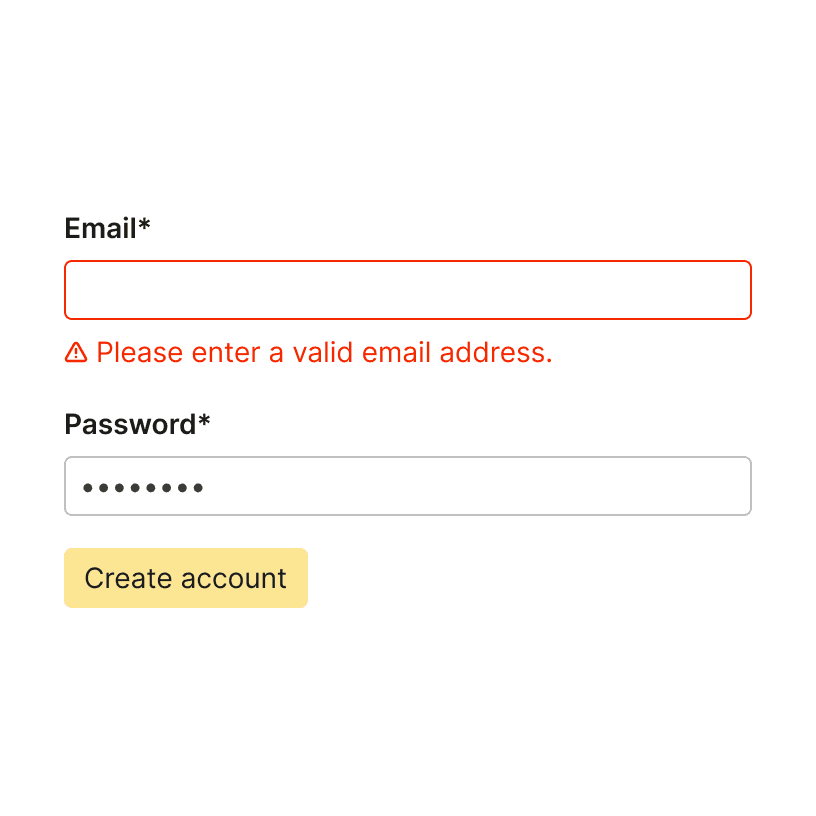
Avoid disabling a submit or primary CTA button on a form when inline validation can do the same job. Disabled submit buttons force users to guess which field is blocking progress, often causing repeated re-entry of correct data. ¹
Do

Don't
Don’t replace errors
Do not disable a button as a substitute for error messaging. When a user attempts an incomplete action, an enabled button that triggers clear, specific inline errors is more informative and less frustrating than a button that silently does nothing. ¹ ⁴
Prefer enabled
Before defaulting to a disabled button, consider whether an always-enabled button with contextual error feedback would serve users better. In most form and task-flow contexts, enabling the button and surfacing inline guidance on click is the preferred pattern. ¹ ⁴
When to use disabled buttons
Require prerequisites
Use a disabled button when a prerequisite condition must be met before an action can proceed, such as completing a step on a different page, so users understand the action exists but is not yet available. ²

Do
No changes
When viewing an editable object, use a disabled save button to indicate to the user that "no changes have been made".
Validation constraints
If not all required items are visible or validation would be too costly, disable the button until all conditions are met.
Disable, don’t hide
Prefer disabled over hidden when you want users to be aware that a feature or action exists. Disabled features help users learn the interface and understand what is possible, for example signaling the benefits of an upgrade tier. ⁴
Explain why
When a button must be disabled, always explain why. A tooltip, helper text, or inline message should communicate what condition will unlock the button, reducing guesswork and abandonment. ¹ ³

Do