Anatomy
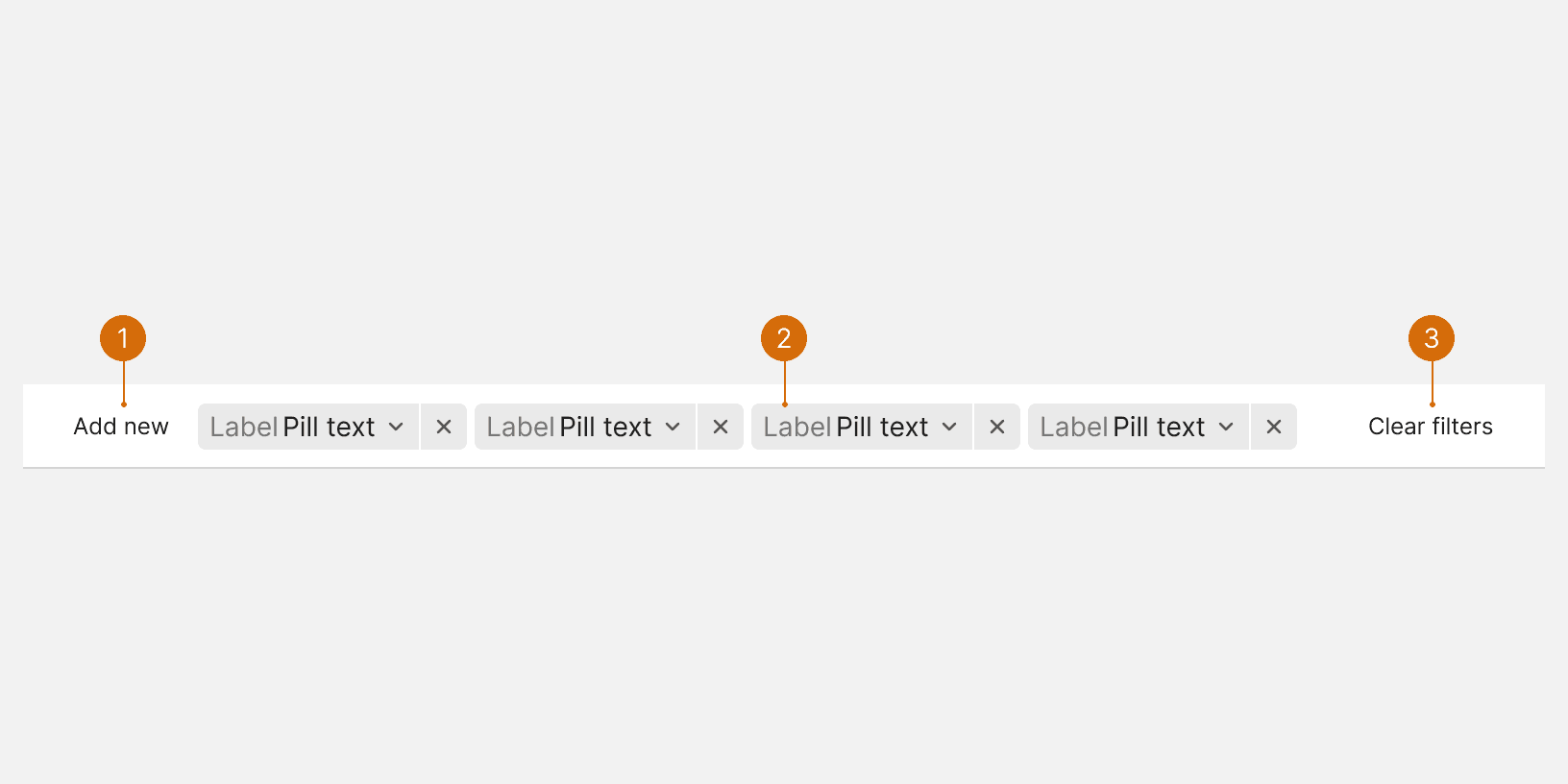
Add new: Let's users choose from different filters or categories of filters.
Filter pills: Pills are used to represent the applied filters.
Clear filters: Removes all applied filters.
States
Best Practices
Mirror data
The filter categories and options should mirror the data. For example, if your data contains "Brand: Acme Inc.", users will expect to see this as a filter option. ¹

Do
Search
Filter categories that contain a large number of choices should include a search to help users quickly find the option they are looking for. ²

Do

Don't
Filter pill text
The pill text should display the names of the selected filters. The pill will truncate the text when it's max-width is reached.

Do

Don't
Prioritize filter categories
When there are many available filter categories, the most used filters may be used to pre-filter the data. This can help users adjust and discover additional filters. ³
More
Related Pages

Additional Reading
Filter UX Design Patterns https://www.pencilandpaper.io/articles/ux-pattern-analysis-enterprise-filtering
Designing Filters That Work: Best Practices and Guidelines https://www.smashingmagazine.com/2021/07/frustrating-design-patterns-broken-frozen-filters/
Defining Helpful Filter Categories and Values for Better UX https://www.nngroup.com/articles/filter-categories-values/